





In today’s fast-paced digital world, laptops are essential, but they often lack the ports and power needed for a full workstation. That’s where a Docking Station comes in. Whether you’re working remotely, in an office, or managing a hybrid setup in the USA, this simple device can transform how you use your laptop.
This guide answers all your key questions while helping you decide if a port replicator is right for you.
What Is a Docking Station?
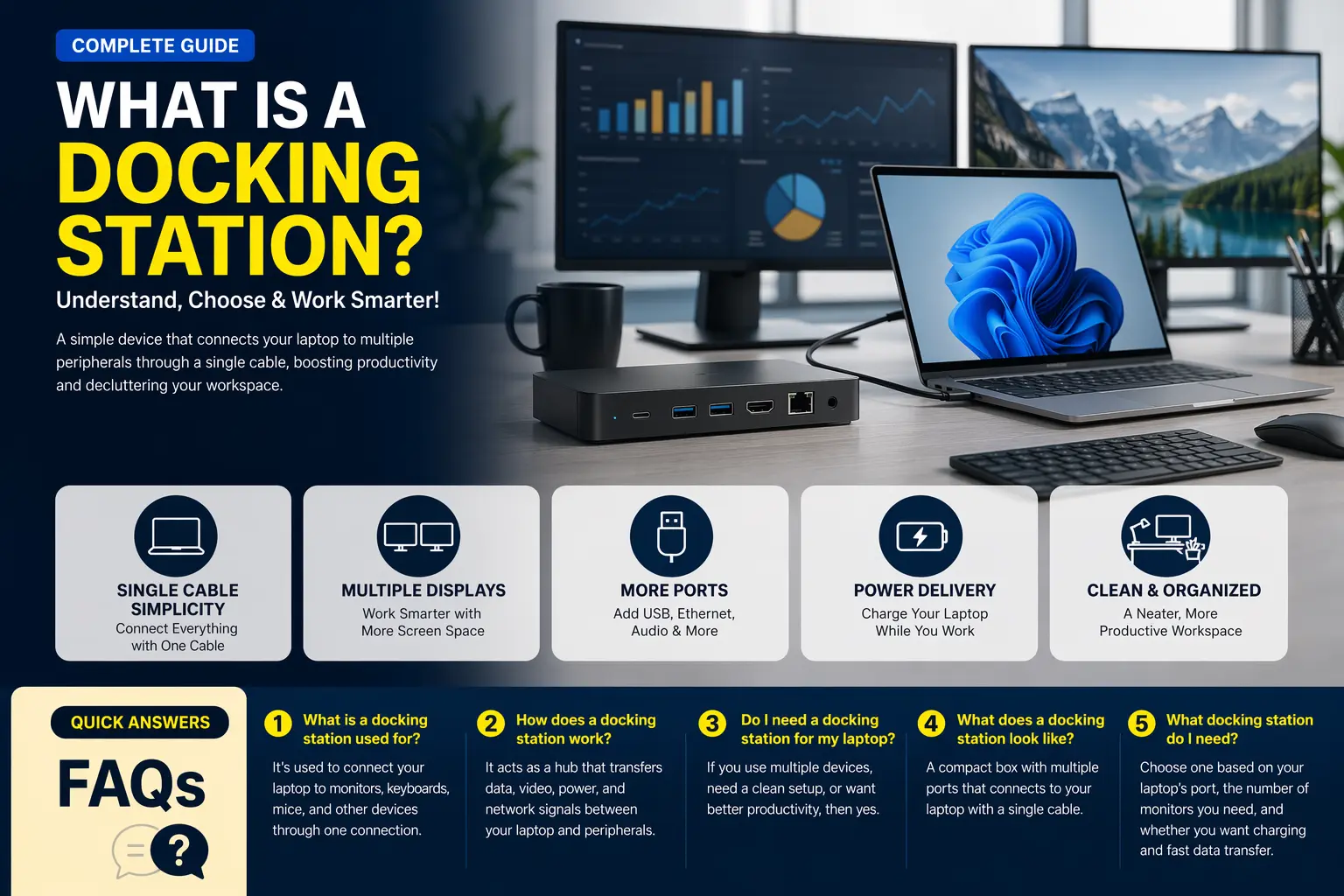
A Docking Station is a hardware device that connects your laptop to multiple peripherals like monitors, keyboards, mice, external drives, and Ethernet through a single cable.
Instead of plugging in several devices individually, a port replicator allows you to connect everything at once, making your workspace cleaner and more efficient.
Professionals across the USA, from corporate offices in New York to home setups in California, use docking solutions to streamline productivity.
How Does a Laptop Docking Station Work?
A port replicator works by acting as a hub between your laptop and other devices. It connects through a USB-C, Thunderbolt, or USB-A port.
Here’s how it functions:
- Transfers data between devices
- Powers your laptop (in many cases)
- Enables multiple display outputs
- Connects to wired internet for stability
Modern docking systems use high-speed protocols like Thunderbolt, which makes a port replicator extremely fast and reliable for demanding tasks like video editing or coding.
What Does a Docking Station Do?
A Docking Station expands your laptop’s capabilities by adding more ports and features.
Here’s what it typically does:
- Connects multiple monitors
- Adds USB ports for accessories
- Enables wired Ethernet connection
- Supports audio devices
- Charges your laptop
For professionals working long hours, a port replicator reduces cable clutter and improves workflow efficiency significantly.
What Does a Laptop Docking Station Do for Productivity?
A Docking Station is not just about connectivity, it’s about productivity.
Imagine working on a small laptop screen versus dual or triple monitors. With a port replicator, you can:
- Multitask easily
- Improve workflow speed
- Reduce physical strain
- Create a permanent desk setup
In many US workplaces, especially tech companies and remote teams, using a Docking Station is considered essential for maximizing performance.
What Does a Port Replicator Look Like?
A Docking Station typically looks like a compact rectangular box or a slim horizontal device.
Common design features include:
- Multiple ports on the front and back
- A single cable connecting to the laptop
- LED indicators for power/status
- Lightweight and desk-friendly design
Some premium models used in US offices have sleek aluminum finishes, making a port replicator both functional and stylish.
What Is a Docking Station Used For?
A Docking Station is used to create a desktop-like experience using a laptop.
Common use cases include:
- Remote work setups
- Office workstations
- Creative professionals (design, editing)
- Gaming setups
- IT and programming environments
For example, a remote worker in Texas might use a port replicator to connect dual monitors, a keyboard, and a wired internet connection for seamless video conferencing.
What Is the Purpose of a Docking Station?
The main purpose of a Docking Station is to simplify connectivity and improve efficiency.
Instead of dealing with multiple cables every time you sit down, a port replicator lets you plug in just one cable and instantly connect to your entire setup.
This is especially useful in:
- Hot desk environments
- Hybrid workspaces
- Shared office setups
It ensures consistency and saves time daily.
What Is a Computer Docking Station?
A Docking Station (also called a computer port replicator) is designed for laptops but can also support tablets and ultra books.
It acts as a bridge between portable devices and a full desktop ecosystem.
Modern workplaces in the USA rely heavily on docking solutions because they allow employees to transition between mobility and productivity effortlessly using a port replicator.
What Docking Station Do I Need?
Choosing the right port replicator depends on your needs.
Consider these factors:
1. Port Compatibility
Make sure your laptop supports USB-C or Thunderbolt.
2. Number of Monitors
If you need dual or triple screens, choose a Docking Station that supports multiple displays.
3. Power Delivery
Look for models that can charge your laptop.
4. Usage Type
- Basic work → Standard USB docking
- Heavy tasks → Thunderbolt docking
Brands like Grand Time offer reliable and versatile docking solutions designed for modern professionals, ensuring both performance and durability.
Do I Need a Docking Station for My Laptop?
Not everyone needs a port replicator, but it’s highly beneficial if you:
- Work from home regularly
- Use multiple devices
- Need better organization
- Want a professional desk setup
If you only use your laptop casually, a port replicator may not be necessary. However, for productivity-focused users, it’s a smart investment.
How Does a Port Replicator Improve Work Setup in the USA?
Work culture in the USA has shifted toward hybrid and remote environments. A Docking Station plays a crucial role in this transition.
For example:
- Remote workers use docking setups for Zoom meetings
- Offices use them for hot-desking systems
- Freelancers use them for multi-monitor editing
With increasing reliance on digital tools, a port replicator helps maintain efficiency across different work environments.
Why Choose Grand Time Docking Solutions?
When selecting a docking solution, reliability matters. Grand Time stands out by offering:
- High-speed connectivity
- Durable build quality
- Multi-device compatibility
- User-friendly design
Whether you’re setting up a home office or upgrading your workstation, Grand Time provides solutions tailored to modern needs.
Final Thoughts
A Docking Station is no longer a luxury, it’s a necessity for modern work environments. From improving productivity to simplifying connectivity, it offers unmatched convenience.
Whether you’re a professional, freelancer, or remote worker in the USA, investing in a reliable solution like Grand Time can significantly enhance your daily workflow.
FAQs
1. What is a docking station used for?
A docking station is used to connect your laptop to multiple peripherals like monitors, keyboards, and external drives through a single connection.
2. How does a laptop port replicator work?
It works by acting as a hub that transfers data, power, and connectivity between your laptop and other devices.
3. Do I need a docking station for my laptop?
You need one if you use multiple devices, work professionally, or want a cleaner and more efficient workspace.
4. What does a docking station look like?
It usually looks like a small rectangular device with multiple ports and a single cable connecting to your laptop.
5. What docking station do I need?
The right choice depends on your laptop compatibility, number of monitors, and usage requirements.